How to place a split order ?
To place Split Order for Single Leg Order, follow these steps:
- Login to Flip Mobile App.
- Locate the More Icon and click on it to navigate to the More page.
- Click on Settings to get redirected to the "Settings" page.
- In the "Settings" page locate and select "Default Order Settings".
- Now click on the "Futures" tab to activate the "Split Order for Futures".
- Within the "Futures" tab, enable the "Advanced Preset" toggle to access "Advanced Settings" Option.
- Then, click the Checkbox near "Allow Split Order."
- A Tick Mark will appear, indicating that Split Order feature for Futures Contract is now activated.
- Repeat the same for the "Options" by going to the Options tab for activating Split Order feature for Options Contract.
- Confirm and Save the "Settings" before you return to the "Watchlist".
Please Note : The Split Order is not enabled by default, as this feature may not be utilized by all traders.
- From Watchlist select the Futures or Options (Nifty, Bank Nifty, Sensex) contract for which you would like to place the order.
- Click "Buy" to proceed with placing the Order.
- Once you are on the Order Window, choose the "Order Type".
- Next enter the "Quantity". For example enter 100 quantities.
- Leave the "Product Type" and "Time Condition" as it is.
- Now, click the "Review Order" Button at the bottom of the page.
- You will be redirected to the Order Confirmation window, where you can see all the Order details including the Order Split.
- Here, you can see that Order one and two are for 36 lots each and Order three is for 28 lots, making the total of 100 lots.
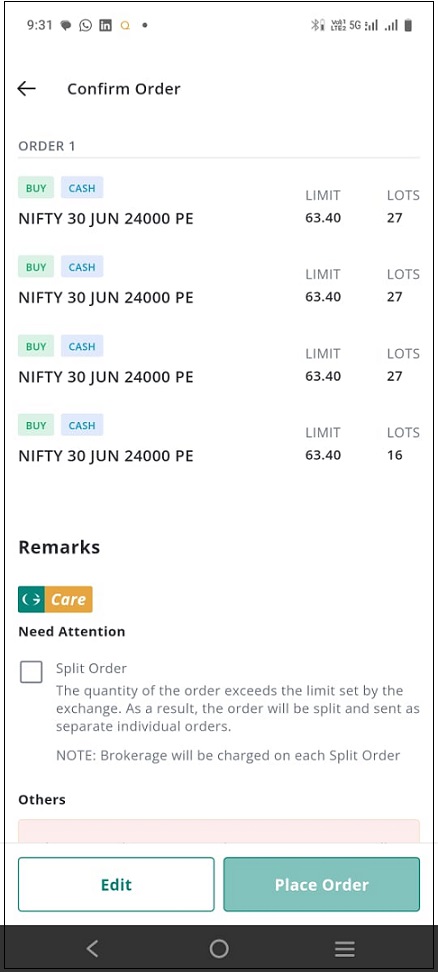
- However, the "Place Order" Button will not be activated now. To activate the button you need to Check the Checkbox near Split Order.
- Once the "Place Order" Button is active, click on it to send the order to the exchange.
- Along with the "Place Order" Button, you can find "Edit" Button. Click on it if you wish to make any changes in the Order.
Please Note: Due to liquidity issues, currently, Split Order is only available for Nifty, Bank Nifty and Sensex contracts.To place Split Order for Multi-Leg Order, follow these steps:
Here, let's see how to place 100-lot Ironfly Order
- Go to Watchlist page and choose the desired "Futures or Options (Nifty, Bank Nifty, Sensex) contract".
- You will be redirected to the "Security Page".
- Locate and Click the "Option Chain" Button on the top of the page and select the desired "Expiry".
- Once the Option Chain opens, click the "Bid Price" for both the "Call" and "Put" options to create a Straddle.
- After that click on the "Ask Price" to buy the protection wings, which must be 200 points away to complete the Ironfly Strategy.
- You may notice that lot size is already displayed as 100, as it has been set as the default lot size.
- However, when you open the order, the default order lot size provided by the platform will be 1.
- To Review and Modify the Price and Quantity, use the Expand Icon.
- Then click the "Review" Button and you will get redirected to the Order Confirmation page.
- Here, each of your leg will be split into three orders.
- Check the order details again and click the Checkbox next to the Split Order to activate the "Place Order" Button.
- Click the "Place Order" Button to send the order to the exchange.
Please Note: Before clicking the Place Order button you have the option to Edit the Order by clicking the Edit Order button.Still need help? Create Ticket


