Can I start a Systematic Transfer Plan (STP) or Systematic Withdrawal Plan (SWP) on FundsGenie? | Step-by-Step Guide
Yes, you can start a Systematic Transfer Plan (STP) on FundGenie. However, Systematic Withdrawal Plan (SWP) is currently not available online and requires assistance from a branch.
Systematic Transfer Plans Vs Systematic Withdrawal Plan
An STP allows you to transfer a fixed amount between two funds within the same AMC, at regular intervals, helping you move money gradually instead of all at once.
Whereas, s Systematic Withdrawal Plan (SWP) allows investors to withdraw a fixed amount from their mutual fund investment at regular intervals over a specified period.
How to place STP (Systematic Transfer Plan) order through FundsGenie App ?
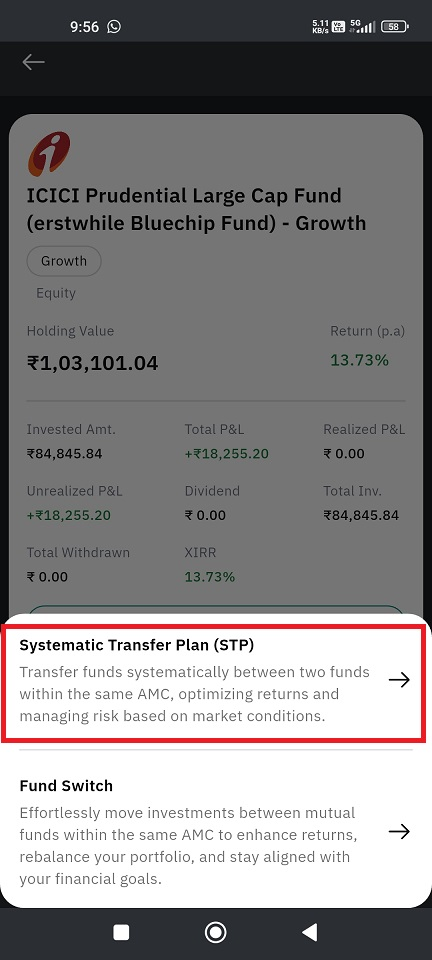
To start a Systematic Transfer Plan (STP) on FundsGenie web platform :
Step 1. Log in to FundsGenie and go to My Portfolio
Step 2. Select More next to the desired fund name under My Investments / Investments Outside Geojit
Step 3. Click STP
Step 4. Enter the required STP Amount, Order Type (Physical / Demat), Investment Frequency, Investment Day (Date) & Tenure > Proceed
Step 5. Select the fund you wish to switch/transfer to > Proceed
If your order type is Physical, you will be required to authenticate the order through the email/SMS sent to your contact details registered with the folio.FAQ
Still need help? Create Ticket


